This article covers error proofing manual assembly with computer vision: why errors on manual stations slip through, how a camera can verify each step automatically, what it takes to build such a system, and when it's worth it.
Where the errors come from
Operators on a manual assembly line repeat the same task hundreds of times a day. After a while, the work runs on muscle memory, and muscle memory drifts. On the other hand, new people on the station haven't built the routine yet. Additionally, the environment is often full of distractions.
Many assembly manufacturing errors can't be seen in the finished product. Bolts tightened in the wrong order look exactly like bolts tightened in the right one. A missing O-ring stays hidden inside a closed housing. Unless a test happens to catch it, the unit passes the final check and ships.
The cost shows up later, at the customer’s site. It comes as a failure in the field, a service visit, a warranty claim, and a hit to your reputation.
What plants already do about it
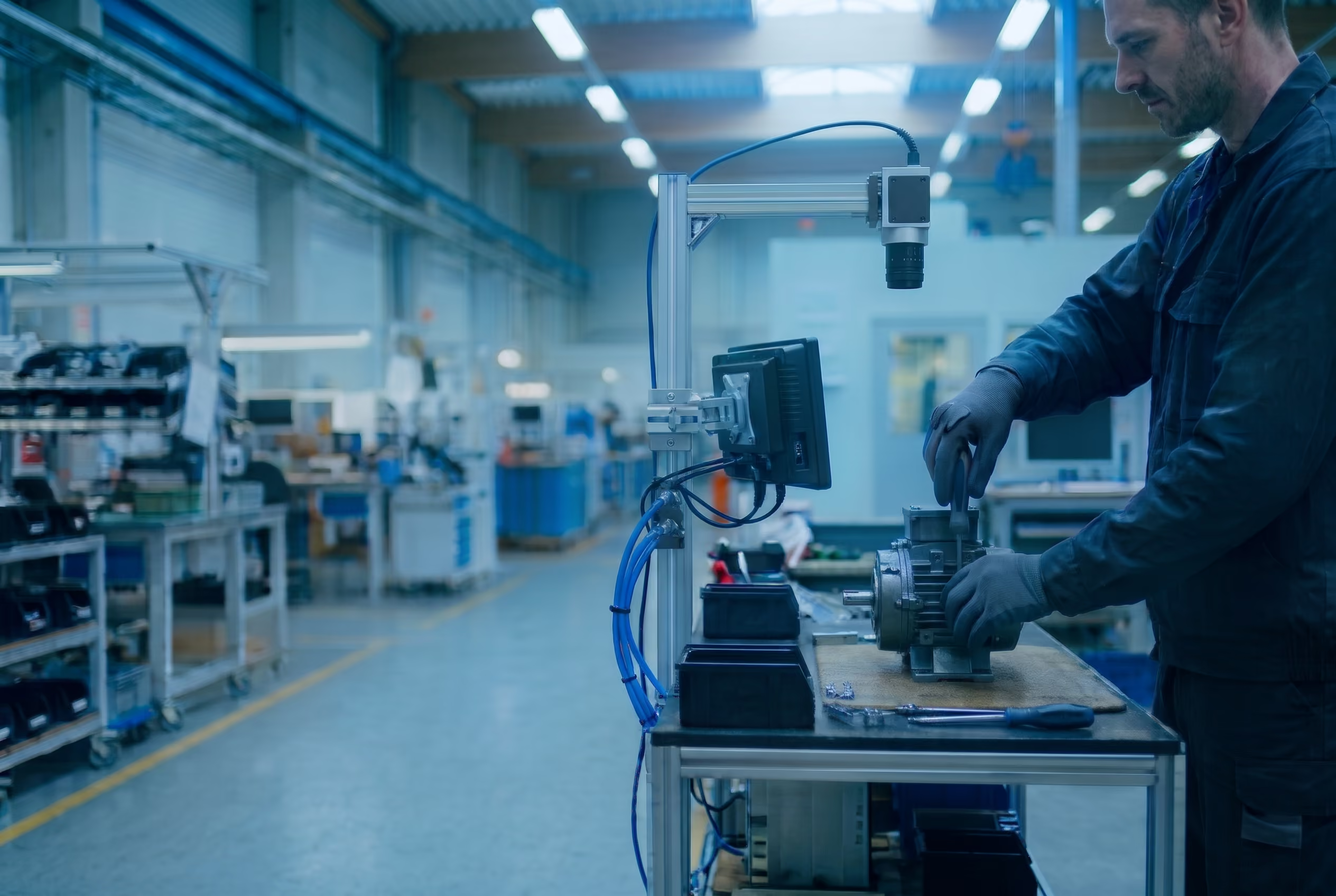
There are multiple approaches: an extra inspection step, a second person looking over the first one's work, a checklist signed at the end of each cycle. These help, but they rely on the same thing that failed in the first place: a person paying attention to a repetitive task.
Toyota offers an interesting example: job rotation. At its San Antonio plant, operator teams move between stations every two hours, working two to four different jobs in a shift. The main reason is ergonomics, but rotation also keeps operators attentive: someone who has just arrived at a station is more likely to notice an odd-looking part than someone who has been looking at the same part for six hours.
Then there are poka-yoke systems: fixtures, sensors, and counters that make an error impossible or flag it the moment it happens. Each device checks one thing, so it struggles with long sequences, many variants, and flexible parts, as we describe in our guide to poka-yoke in manufacturing.
Computer vision error proofing: how it works
Computer vision error proofing uses a camera and an AI model to check every step of a manual assembly operation in real time. The AI model recognizes the parts, the tools, and the operator’s hands in every frame. When a step is missed or done out of order, the system flags it before the unit moves on.
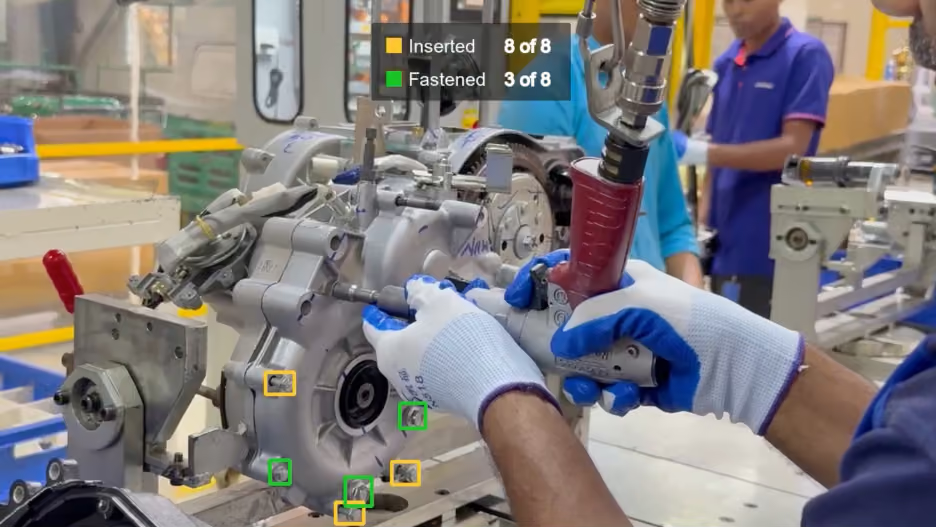
The AI model finds the bolts and the tool in each frame. The logic decides when a bolt counts as fastened and how many are still left.
How to build a camera-based mistake proofing system
A working assembly verification system takes more than a camera and a computer vision model.
Defining the process
- Map the steps. Write down every step of the operation, the order the steps have to follow, and the errors that occur most often. This list defines what the AI model has to recognize and what the logic has to check.
- Decide what happens when an error is detected. Options include an audible alarm, a light at the station, a flag on the unit or batch, stopping the process, or simply logging the deviation in the recording. The stronger the reaction, the more each false alarm costs. An AI model can also flag a step that was done correctly.
- Decide where the system runs. On-premise (on a computer at the station or in the plant's server room) or in the cloud. Plants that don't want production footage leaving the site usually choose on-premise.
Building the system
- Train the computer vision model. The AI model learns to recognize what matters at the station, such as parts, tools, and hands. It's trained on frames taken from recordings of that specific station, so it learns the real parts under the real lighting.
- Track objects across frames. Detections from consecutive frames are linked into the same object, even when it disappears behind a hand for a moment. Without tracking, the system wouldn't know that an object briefly covered by the operator's hand is still the same object.
- Build the process logic. Rules on top of the detections: zones, sequence, counts, and time. Recognizing the parts is the AI model's job. Deciding whether those parts have been assembled together is the logic's.
- Build the software around it. An application that processes the video, runs the AI model and the logic, and sends an alert when a step goes wrong.
- Prepare the environment. The application and the AI model need a device to run on: a computer at the station, a server, or a cloud instance, depending on where you decided to run the system. At some stations, the operator also needs a screen that shows the camera view.
- Deploy and integrate. Connect the system to the camera and to whatever handles alerts at the station. An existing CCTV or monitoring camera can work if it sees the steps clearly. Set up an automated way to roll out updates, because the AI model and the logic will change whenever the process does.
Example: engine assembly
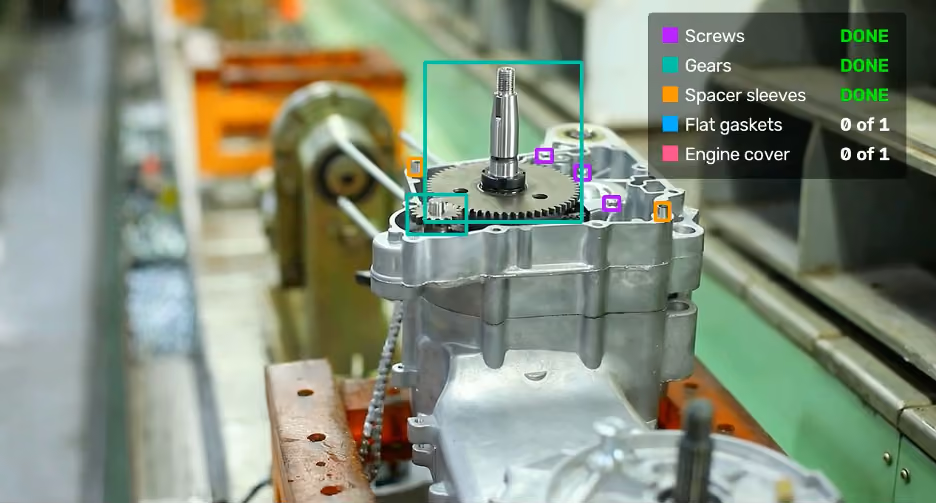
A frame from our engine assembly prototype. Each color marks one type of part, and the panel shows the progress of the current unit.
This frame comes from one of our prototypes, built for an engine assembly. The system tracks five types of parts, each marked with its own color: screws, gears, spacer sleeves, flat gaskets, and the engine cover. The panel in the corner shows the progress of the current unit. Screws, gears, and spacer sleeves are done. The flat gasket and the engine cover haven't been fitted yet.
The AI model finds the parts in each frame. The logic decides when a part type counts as done and what's still missing.
When error proofing manual assembly with a camera makes sense
A camera isn't the right tool for every station. It works best when four conditions are met.
- The process repeats in a fixed sequence. The steps can be written down, and they're the same in every cycle.
- Every step is visible. In practice, that comes down to three things:
- The work area stays in view. Hands, a housing, or the operator's body can block it, and sometimes the fix is a second camera.
- The parts can be told apart in the image. Small parts and similar-looking variants need a closer shot or a higher resolution. If a person can’t tell them apart in the footage, the model won’t either.
- The camera position and the lighting stay the same.
- An error is expensive. A system like this isn't cheap to build: costs start at a few thousand dollars. It pays off only where errors cost more than that, either because a defect that reaches the customer costs a lot, or because the current way of catching errors does.
- The process doesn't change often. Every change to the process means retraining the AI model and updating the logic. If the station changes every few weeks, keeping up becomes a burden.
What else the recordings give you
Verifying every cycle means recording every cycle. That gives you data a fixture or a checklist can't:
- Station metrics. Cycle time and the time of each step, the number of units built, skipped steps, and rework.
- Bottlenecks. Which step takes the longest, where step times vary the most, and how shifts compare. One station only shows its own bottleneck, though. To find the bottleneck of a whole line, you need to measure several stations.
- Error trends. Because every deviation is logged, you can see whether errors at a station are becoming more frequent. A rising count can be an early sign that something has changed, such as a new batch of parts or a worn fixture.
Getting started
The simplest way to find out whether this works for you is a proof of concept on one station with a simple process. It shows whether a camera can reliably confirm the steps there and whether the system fits your current setup before you commit to more.
That's how Manual Assembly Monitoring, our computer vision service for manual workstations, starts at Codya: with a proof of concept on one station, using footage of your actual process.
Struggling with assembly errors at your plant? Tell us about it. From the first recording of your process, we'll be able to tell whether catching errors with computer vision makes sense for you.
FAQ
What errors can computer vision catch in manual assembly?
Missing parts, wrong parts, skipped steps, and steps done in the wrong order. The parts have to look different in the image, and each step has to be visible to the camera.
Does someone have to watch a screen all the time?
No. The system signals an error with a sound, a light, or a message at the station, so the operator reacts only when a step goes wrong. A screen with the camera view helps at some stations, but it isn’t required.
Can we use the cameras we already have?
Often, yes. An existing CCTV or monitoring camera can work if it sees every step clearly and its position and lighting don’t change. If it doesn’t, a dedicated camera goes over the station.
Does the system need the cloud?
No. It can run on-premise, on a computer at the station or in the plant’s server room, so production footage never leaves the site. A cloud setup is also possible.
Does the AI model learn new product variants on its own?
No. The AI model learns from recordings of the real process, so each new variant needs new examples. Every change to the process also means retraining the AI model and updating the logic.
How is it different from poka-yoke devices like sensors or pick-to-light?
Each poka-yoke device checks one thing, such as whether a part is present or which bin was picked from. A camera checks several parts, the tools, and the order of steps at the same time.
How much does a computer vision error proofing system cost?
Costs start at a few thousand dollars. Every manual process needs its own approach, its own AI model trained on that process, and its own deployment.